
Free Online Video Converter
YouTube to MP4 Converter
Save YouTube videos and Shorts as MP4 files with sound. Paste a link and choose the available quality, up to 4K.
No sign-up · No installation · No ads
What is YouTube to MP4?
YouTube to MP4 lets you save a YouTube video as a video file for offline watching. MP4 keeps the picture and sound together and works with many phones, computers and media players.
Paste a video or Shorts link into Y2Mate, then select MP4 and an available resolution in the download panel. Quality depends on the original video and the options offered by the service.
Online Offline
video.mp4
Ready to save
How to convert YouTube to MP4
-
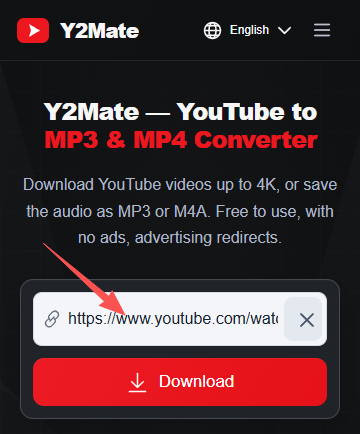
Copy and paste the link
Copy the YouTube video or Shorts link and paste it into the field above. The download options will load for your video.
-
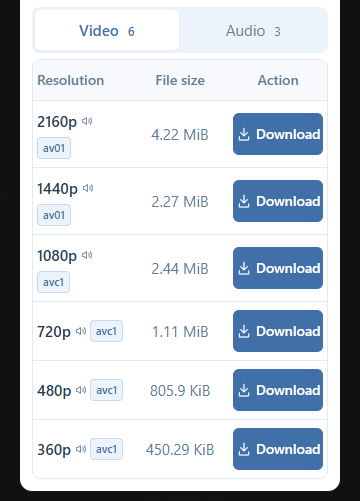
Choose MP4 and quality
Select MP4 in the download panel, then choose an available resolution. Higher resolutions generally need more storage.
-
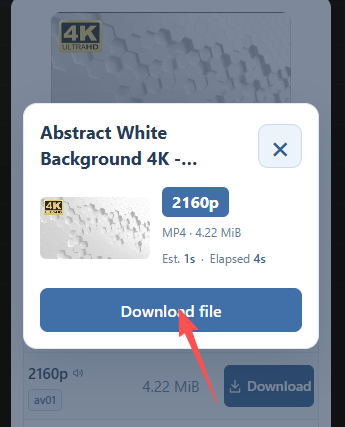
Save your video
Wait for preparation to finish, then use the download control to save the MP4 file. Check your browser’s Downloads list.
Why use Y2Mate for YouTube to MP4?
-
No ads or advertising redirects
Choose your download without pop-up ads or being sent to unrelated websites.
-
Video up to 4K
Download available MP4 videos in 1080p, 1440p, or 2160p (4K), directly in your browser. Available resolutions depend on the original video.
-
Download speeds up to 10 MB/s
At 10 MB/s, a 100 MB file transfers in about 10 seconds. Actual speeds vary with your connection and server load. Video preparation or audio conversion takes additional time.
-
Free, with nothing to install
Download in your browser without creating an account, installing an app, or adding a browser extension.
YouTube to MP4 — Frequently asked questions
How do I convert a YouTube video to MP4?
Paste a YouTube video link into the input, wait for the download options, then choose MP4 and a resolution. Once preparation finishes, use the download control to save the file.
Is the YouTube to MP4 converter free?
Yes. You can use Y2Mate without payment, an account, an app or a browser extension.
Can I download YouTube videos in 1080p or 4K?
Choose 1080p, 1440p or 2160p (4K) when offered for your video. Available resolutions depend on the source video and the download service; converting a lower-quality source cannot add detail.
Will the MP4 file include sound?
Select an MP4 video-with-sound option in the panel. Higher-quality video may need preparation to combine picture and audio before the file is ready.
Can I convert YouTube Shorts to MP4?
Yes. Paste a direct YouTube Shorts link and choose an available MP4 option, just as you would for a regular video.
Can I use this on my phone?
Yes. Use your mobile browser on Android or iPhone, paste the link and select MP4. No app installation is required.
Where is my downloaded MP4 file?
Check your browser’s Downloads list and the folder configured for downloads. On iPhone, also check Downloads in the Files app; the file is not automatically added to Photos.
How long does conversion and downloading take?
Preparation time depends on the video length, resolution and server load. File transfer speed also depends on your connection. Keep the page open while preparation finishes.
Why did my MP4 download fail?
Check that the video is accessible and the link is correct. Check your connection, retry after the failed request ends, or choose a lower resolution. Private, removed or restricted videos may be unavailable.
Will the MP4 play on my device?
MP4 is widely supported, but playback also depends on the codec, resolution and player. If a file does not play, try another available quality or a compatible media player.