
YouTube Video Downloader
Y2Mate — YouTube to MP3 & MP4 Converter
Download YouTube videos up to 4K, or save the audio as MP3 or M4A. Free to use, with no ads, advertising redirects.
No sign-up · No installation · No ads
Why I built Y2Mate
I searched for “Y2Mate” because I wanted to download a video. Clicking Download opened advertising pages. On my phone, I couldn’t tell whether the download had even started. Other sites asked me to install software for higher resolutions, or stopped at 1080p.
I built y2mate to make that process straightforward: paste a link, choose your format, and save your file. No advertising detours, no account to create, and no extra software.
Online Offline
video.mp4
Ready to save
From link to file in three steps
-
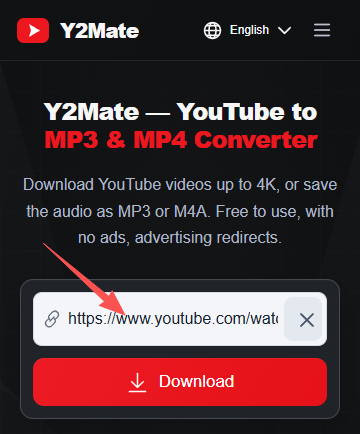
1. Paste your link
Copy a YouTube video or Shorts link and paste it into the box above.
-
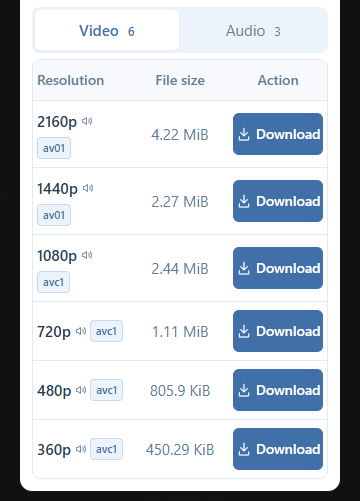
2. Choose your download
Select MP4, M4A, or MP3, then pick an available resolution or bitrate.
-
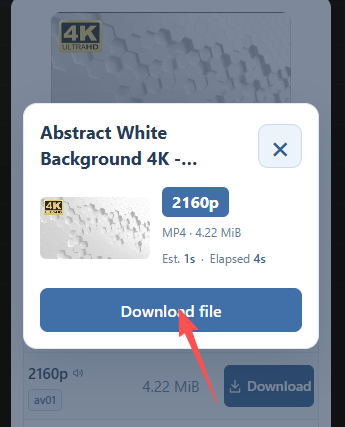
3. Save your file
Click Download. If your file needs processing, wait for it to finish, then save it to your device.
What you get with Y2Mate
-
No ads or advertising redirects
Choose your download without pop-up ads or being sent to unrelated websites.
-
Video up to 4K
Download available MP4 videos in 1080p, 1440p, or 2160p (4K), directly in your browser. Available resolutions depend on the original video.
-
Download speeds up to 10 MB/s
At 10 MB/s, a 100 MB file transfers in about 10 seconds. Actual speeds vary with your connection and server load. Video preparation or audio conversion takes additional time.
-
Free, with nothing to install
Download in your browser without creating an account, installing an app, or adding a browser extension.
Find the right YouTube converter
Save the full video or just the audio. Explore the converter that fits your download.
Choose your video or audio format
-
MP4 video
Save the video with sound. Choose from the resolutions available for your link, including Full HD, 1440p, and 4K.
-
M4A audio
Save the audio without the video as an M4A file.
-
MP3 · 128 kbps
A smaller audio file for everyday listening and saving storage space.
-
MP3 · 320 kbps
A higher-bitrate MP3 option. Final audio quality depends on the source recording.
Download YouTube Shorts in your browser
Save Shorts as MP4 video, or download just the audio as MP3 or M4A. Copy the link from YouTube, paste it into Y2Mate, and choose your format.
Works on phones and computers. No app, account, or browser extension needed.
Questions before you download?
Is Y2Mate free to use?
Yes. Downloads on y2mate are free, and you don’t need to register or sign in.
Will clicking Download open advertisements?
No. y2mate does not display ads, open advertising pop-ups, or send you to advertising pages.
Can I download 1440p and 4K videos?
Yes, when those resolutions are available for the original video. Paste your link to see the download options we can provide.
Why isn’t 4K available for every video?
The available resolutions depend on the source. A video uploaded in 1080p won’t have a genuine 4K version to download.
Which audio format should I choose?
M4A is ready faster because it uses YouTube’s audio directly without re-encoding, but has more limited compatibility. MP3 at 128 or 320 kbps works with more devices and players, but takes slightly longer to prepare because the server needs to re-encode the audio.
Why do some downloads need processing?
Some higher-resolution videos have separate video and audio streams that need to be combined. MP3 downloads also require audio conversion. This processing happens before your file is ready to save.
Has the site been checked for security threats?
The site has been tested with Malwarebytes Browser Guard, with no threat warnings reported during testing. You do not need to install software or browser extensions to use Y2Mate.
Where will my downloaded file be saved?
Your browser controls where files are saved. Check its Downloads list or your device’s Downloads folder. Depending on your browser settings, you may be asked to choose a location.